How to Build a RAG Pipeline From Scratch: A Developer's Step-by-Step Guide (2026)
You don't need a Ph.D. in machine learning to build a RAG application. Here is exactly how to build a production-ready RAG pipeline using Python, a vector database, and a single LLM API.
In my first article, I explained that LLM vs ChatGPT vs RAG are three entirely different things.
Now that you understand the difference, the most common question I get from my students and clients is this:
"Okay Teacher, that theory makes sense. But how do I actually build a RAG pipeline from scratch?"
For developers, students, and professionals switching to AI, the hardest part isn't the complexity of the code—it's the overwhelming amount of misinformation online that suggests you need a massive data science team.
You don't.
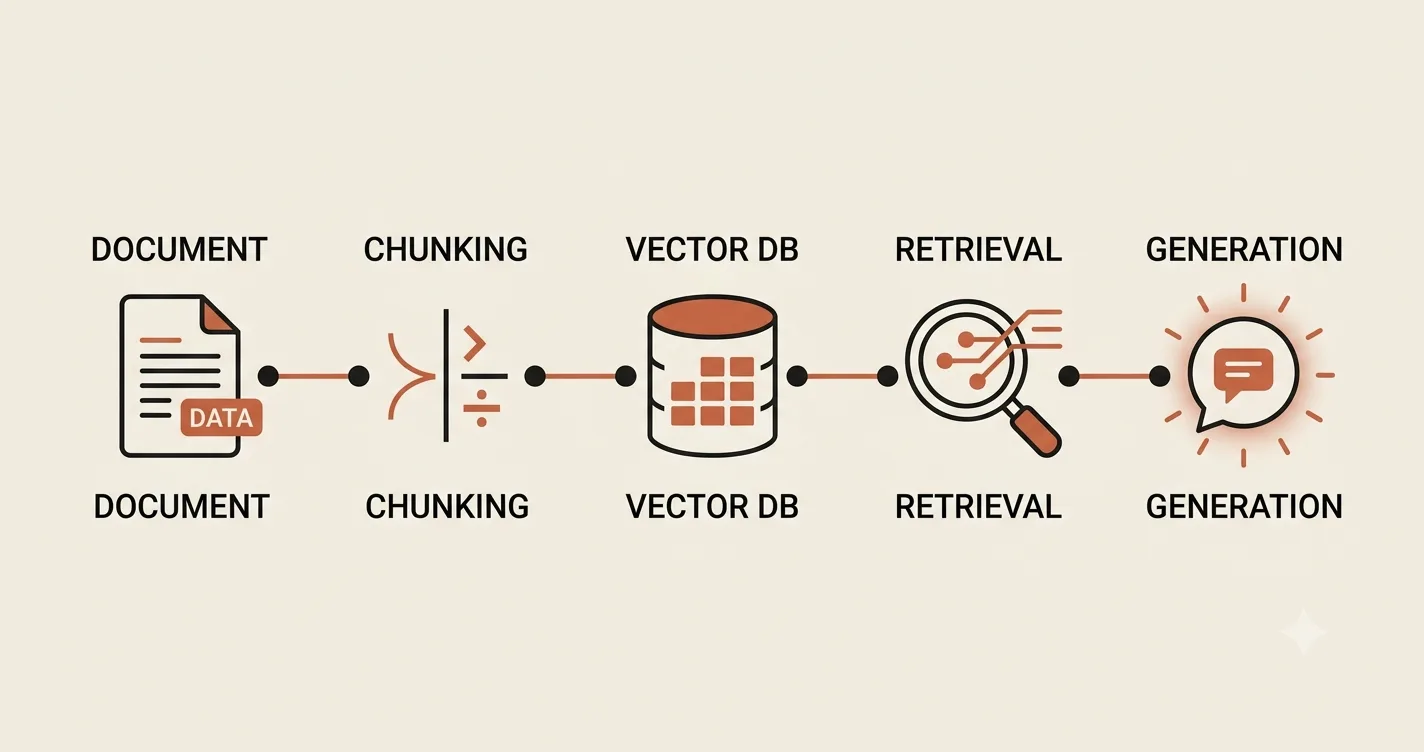
If you know basic Python and understand how to fetch data from an API, you can build a functional RAG (Retrieval-Augmented Generation) application in a weekend. Let me break down the five concrete steps to doing exactly that.
Step 1: The LLM API (The "Brain")
The first thing you need is an interface to the LLM. In 2026, this is as simple as a standard REST API call.
You don't need to set up your own GPU cluster or run Llama-3 locally (though you can). For a first pipeline, I strongly recommend using an easily accessible provider like OpenAI, Mistral, or Anthropic.
Here is what the Python code looks like for the absolute core integration:
import os
from openai import OpenAI

client = OpenAI(api_key=os.environ.get("OPENAI_API_KEY"))

response = client.chat.completions.create(
    model="gpt-4",
    messages=[{"role": "user", "content": "Hello AI!"}]
)
print(response.choices[0].message.content)
That is it. That single code block is your engine. The rest of the RAG pipeline is just teaching this engine what to read before it answers.
Step 2: The Knowledge Base (Chunking & Embeddings)
An LLM on its own doesn't know your business data. Before you can let the AI search it, you have to convert your documents (PDFs, Word docs, text files) into a language the AI can understand mathematically.
This happens in two mini-steps:
- Chunking: You cannot feed an entire 50-page manual into an LLM at once. You have to split it into small chunks (usually 512 to 1024 tokens).
- Embedding: You run each chunk through an embedding model (like
text-embedding-3-small). This turns the text into a long list of floating-point numbers (a vector).
If two sentences mean the same thing, their vectors will be mathematically close to each other.
Step 3: The Vector Database (The "Memory")
Now you have a list of vectors. You cannot store these efficiently in a standard SQL table. You need a Vector Database.
If you are hosting on cheap shared hosting or a standard VPS (like many of my students), I usually recommend pgvector.
Why? Because pgvector is an open-source extension for standard PostgreSQL. If you already have a Laravel or Django app with a Postgres database, you can just add the extension and store vectors right next to your user data. You don't need to pay for a separate expensive vector database service.
The table structure will look roughly like this:
| id | content (text) | embedding (vector) | metadata (JSON) |
|---|---|---|---|
| 1 | "How to train an AI engineer..." | [0.021, -0.541, ...] |
{"source": "training_manual.pdf"} |
Step 4: The Retrieval (The 'R' in RAG)
When a user types a question into your application (e.g., "How do I configure a Redis cache?"), this is the magic that happens:
- Your system converts the user's question into a vector using the exact same embedding model.
- It runs a "cosine similarity" search against your vector database.
- The database returns the top 3-5 document chunks that most closely match the user's question.
In code (using pgvector and SQL), the retrieval looks roughly like:
SELECT content FROM documents
ORDER BY embedding <-> query_embedding
LIMIT 3;
Step 5: The Generation (The 'G' in RAG)
Finally, you wrap the retrieved chunks and the user's question into a prompt, and send it to the LLM.
Your system constructs a prompt like this:
retrieved_context = "Redis is an in-memory key-value store. To configure it on your VPS, edit redis.conf..."
user_question = "How do I configure Redis?"
prompt = f"""
You are a helpful assistant. Use the context below to answer the user's question.

Context: {retrieved_context}

Question: {user_question}
"""
You pass that prompt to the LLM API (from Step 1). The LLM reads your internal document, cross-references it with its general knowledge, and returns a grounded, specific answer that references your data.
Where Does This Fit In Real Production?
I use this exact logic in production. For example, in the Almuneer LMS, student enrollment and course data need to be quickly retrieved to generate bilingual certificates and validate course completion. While Almuneer uses standard SQL lookups for structured data, the fundamental principle is the same: retrieval is the bottleneck, and optimizing it determines the speed of your application.
In the Chandi World jewelry platform, we use this exact embedding and retrieval pipeline to power the AI semantic search. When a customer searches, "elegant gold earrings," the system retrieves the exact products with the closest vector matches, effectively eliminating the need for rigid keyword filters.
Final Thoughts
If you can write a POST request and SELECT statement, you have all the skills necessary to build a functional RAG pipeline.
Do not let the jargon of "Attention Mechanisms" and "Transformers" scare you. Start simple: embed some data, query it with cosine similarity, and feed the result into GPT-4. Once you get that 3-step loop working, you will realize just how accessible modern AI engineering actually is.
If you are currently stuck on your first RAG implementation or are looking for guidance on how to integrate this into your existing business stack, feel free to check out my full engineering portfolio or reach out to me directly. I am always available to mentor developers transitioning into AI architecture.